Common JSON Formatting Errors and How to Debug Them
The nine JSON mistakes that break parsers — trailing commas, smart quotes, duplicate keys and more — with broken snippets, fixes, and a fast debug workflow.
2026/08/11
Why the error position lies
You change one line in a config file, restart the app, and get Unexpected token in JSON at position 217. You stare at position 217 and nothing there looks wrong — because the actual mistake is usually somewhere else, and the parser only noticed once it got that far.
JSON is a deliberately small format with a strict grammar, and that strictness is the whole point: any two parsers should read a file the same way. But it also means JSON rejects several habits that are perfectly legal in JavaScript, and a few more that word processors and copy-paste introduce invisibly. The same handful of mistakes account for nearly every "invalid JSON" error you will ever see.
Quick answer
| Error | Typical symptom | Fix |
|---|---|---|
| Trailing comma | Parser error pointing at } or ] | Delete the comma after the last item |
| Single quotes | "Unexpected token '" | Use double quotes for keys and strings |
| Unquoted keys | "Expecting property name" | Wrap every key in double quotes |
| Comments | Error at the // or /* | Remove them, or use a "_comment" field |
| Missing/extra bracket | Error far from the real mistake | Diff against the last version that parsed |
| Unescaped quote or newline | String ends too early | Escape as \" and \n |
| Duplicate keys | No error — wrong value wins silently | Keep each key once |
NaN / Infinity / undefined | Valid in JS, rejected as JSON | Use null or a string |
| BOM / smart quotes | Error at position 0, or on a quote that "looks fine" | Save as UTF-8 without BOM, retype quotes in a code editor |
The fastest way to find which one bit you: paste the file into the JSON Compare tool and read the live syntax badge — details in the workflow section below.
The nine classic errors
1. Trailing commas
{
  "name": "api-service",
  "port": 8080,
}
Modern JavaScript allows a comma after the last item; JSON never has. Confusingly, the error position usually points at the closing brace on the next line, not at the comma itself — the comma made the parser expect another key, and the } is where that expectation failed. Delete the comma after the final member of every object and array.
2. Single quotes instead of double
{ 'env': 'production' }JSON strings are delimited by double quotes, full stop. Single quotes are a JavaScript convenience that the JSON grammar simply doesn't include. Python's parser is the most explicit about it — Expecting property name enclosed in double quotes — while browsers just complain about an unexpected token. Replace every ' used as a delimiter with ".
3. Unquoted keys
{ retries: 3, timeout: 30 }Legal as a JavaScript object literal, invalid as JSON. Every key must be a double-quoted string: { "retries": 3, "timeout": 30 }. This one appears constantly when someone copies an object out of JavaScript source code and saves it as a .json file.
4. Comments
{
  // maximum retry count
  "retries": 3
}
JSON has no comment syntax — that was an intentional design decision to keep the format data-only. Some tools accept a superset called JSONC (VS Code settings files and tsconfig.json are the best-known examples), which is why a file can work in your editor and still crash your application: the plain parser your code uses rejects it. Either strip the comments or, if you control the schema, move the note into a data field such as "_comment": "maximum retry count".
5. Missing or extra brackets and braces
{
  "servers": ["alpha", "beta",
  "timeout": 30
}
The ] is missing after "beta", but the parser won't complain until it hits : after "timeout" — it still thought it was reading an array. This is the error class where the reported position is most misleading, and where manual scanning fails hardest in long files. The reliable fix is a diff, not a stare-down: put the last version that parsed on one side of the JSON Compare page, today's file on the other, and press Compare — the changed lines corner the missing bracket. It also helps to keep files pretty-printed in the first place: in a consistently indented document a mis-nested block is visible at a glance, while a single 400-character line hides everything.
6. Unescaped quotes and newlines inside strings
{ "message": "He said "stop" right there" }The parser ends the string at the second ", then chokes on stop. Quotes inside a string must be escaped as \", and a literal line break inside a string is equally illegal — JSON forbids raw control characters there, so multi-line text must be written as \n. This bites hardest when JSON is embedded in other JSON as a string (a webhook payload, a logged request body): every inner quote needs escaping, and one missed backslash breaks the whole document.
7. Duplicate keys
{ "timeout": 30, "timeout": 60 }Here's the nastiest one, because it isn't a syntax error at all. The JSON specification (RFC 8259) only says key names should be unique — so most parsers accept this file without a word and keep the last occurrence. Your timeout is silently 60, and no badge turns red. Duplicates usually appear after a messy merge or a hand-edit that pasted a block twice. A structural diff against a known-good version of the file is the practical way to catch them, since your eyes will happily skim past the repeat.
8. NaN, Infinity, and undefined
{ "ratio": NaN, "max": Infinity }These are JavaScript values, not JSON values. JSON's entire vocabulary is objects, arrays, strings, numbers, true, false, and null — nothing else. The trap is asymmetric between languages: JavaScript's JSON.stringify quietly converts NaN and Infinity to null (and drops object keys whose value is undefined), while Python's json.dumps will happily write NaN and Infinity unless you pass allow_nan=False — producing a file Python can read back but nearly everything else rejects. If those values are meaningful in your data, encode them deliberately as null or as strings like "NaN" and handle them in application code.
9. Encoding traps: BOM and smart quotes
Two invisible ways to break a file that looks perfect on screen:
- A byte order mark (BOM). Some Windows editors prepend an invisible
U+FEFFwhen saving UTF-8. Certain parsers skip it; others — including JavaScript'sJSON.parse— fail on the very first character with an unexpected-token error at position 0. Re-save the file as UTF-8 without BOM. - Smart quotes. Draft JSON in Word, Pages, or many email clients and autocorrect will swap straight quotes
"for curly ones“ ”. They look nearly identical and are completely invalid as string delimiters. If a quote "looks right" but the parser rejects it, retype it in a code editor with autocorrect off.
A debugging workflow that actually works
Reading error positions one at a time is slow, because fixing one error just reveals the next. This sequence finds everything in a couple of minutes:
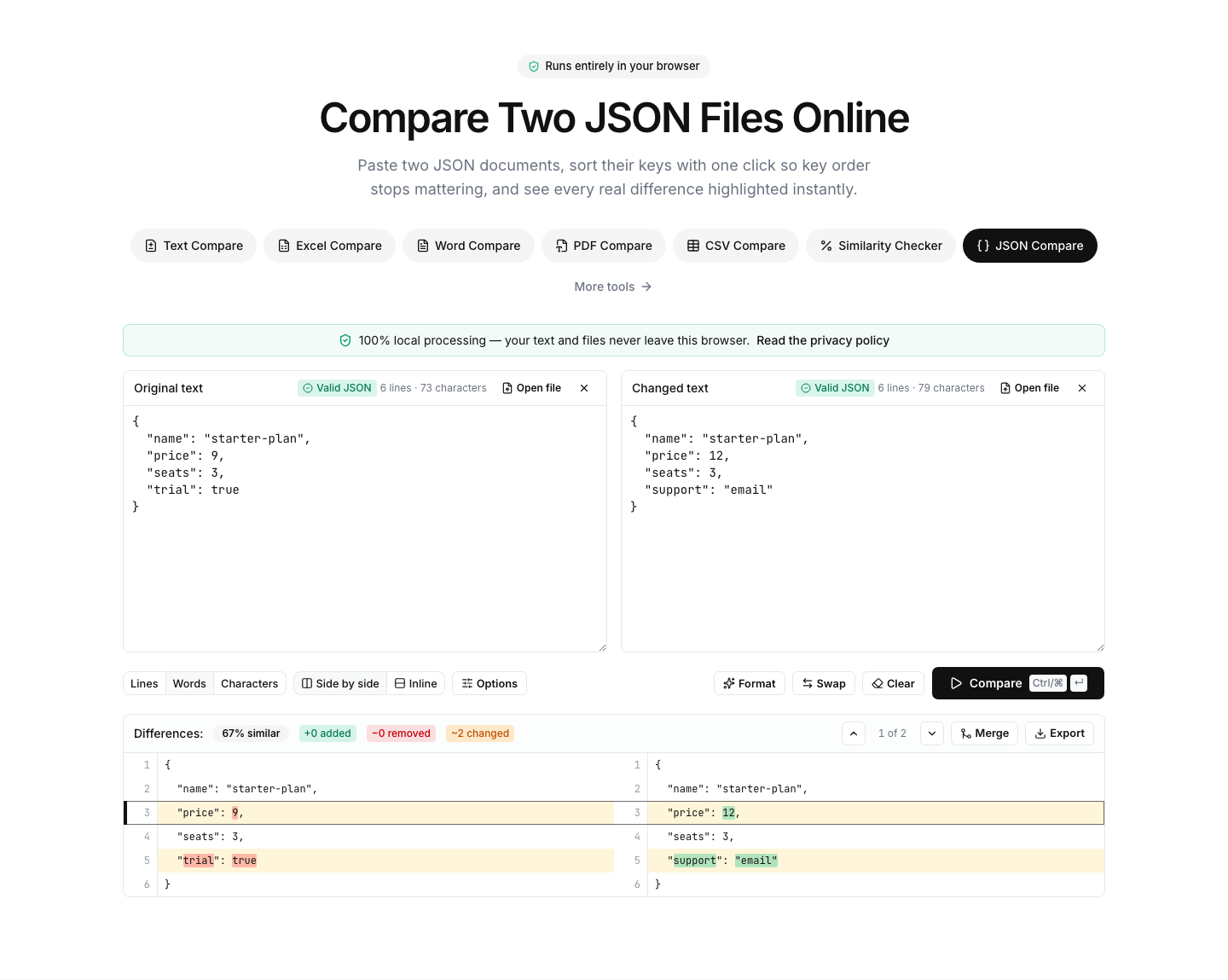
- Validate first. Paste the broken document into the JSON Compare tool. The live syntax badge turns green for valid JSON or red with the parser's own error message, updating as you type — so you can fix, glance, and fix again without re-running anything. Everything happens locally in your browser: nothing is uploaded, which matters more than usual here, since config files routinely contain tokens and connection strings you should never paste into someone's server.
- Beautify as soon as it parses. The Beautify action runs the same strict parser, so on a still-broken document it shows the parse error instead of reformatting — one more pointer at the problem. The moment the badge turns green, one click re-indents the whole document: nesting mistakes that hid on a single 400-character line become visible, and the misleading "error at position 2971" era is over because every value now sits on a readable line.
- Diff broken against known-good. If this file worked yesterday, paste the last working version on one side, today's version on the other, and press Compare. The highlighted lines are almost always where the culprit lives — including the silent ones like duplicate keys and swapped values that no validator flags.
- Sort keys when order differs. Two API responses or two serializer outputs often contain identical data with keys in different order, which makes a naive text diff light up everywhere. Click Format → Sort keys & beautify: both documents are rewritten with alphabetically sorted keys and identical indentation, so identical data compares as identical and only genuine differences remain. This single action turns JSON comparison from noisy to surgical for API work.
The same traps in sibling formats
YAML trades JSON's brackets for significant indentation, which swaps one class of errors for another: a single misplaced space silently changes nesting, tabs are forbidden as indentation, and unquoted strings get surprise type coercion. Because structure lives in whitespace, error line numbers matter far more than error positions — the YAML Compare tool validates with line-numbered errors so you can jump straight to the faulty indent. And since comments are legal in YAML (unlike JSON), its beautifier preserves them when reformatting, so cleaning up a config doesn't destroy its documentation.
XML fails differently again: mismatched or unclosed tags, and raw & or < characters that needed to be escaped as entities. The XML Compare tool runs a real-time validity check on what you paste and includes a pretty-printer, so deeply nested single-line XML becomes readable before you start hunting for the unclosed element.
The bottom line
Almost every "invalid JSON" incident is one of nine mistakes: trailing commas, single quotes, unquoted keys, comments, bracket mismatches, unescaped characters, duplicate keys, JavaScript-only values, or an encoding artifact you can't see. Don't debug them by staring — paste the file into the JSON Compare tool, let the live badge localize the syntax error and beautify once it parses, then diff against a working version (sorting keys first for API payloads) to catch the silent ones. When the broken file is YAML or XML instead, the matching pages give you the same validate-format-diff loop — and in every case the processing stays in your browser, so your configs and their secrets never leave your machine.