How Text Similarity Is Measured: The Dice Coefficient Explained
How text similarity is actually calculated: the Dice coefficient with a worked example, character vs word vs line measurement, and what a percentage tells you.
2026/08/11
Quick answer
Text similarity is a number between 0% and 100% describing how much surface overlap two texts share, computed by a formula that counts common pieces (characters, words, or lines) — not by anything that understands meaning. The three measures you'll meet most often:
| Measure | What it counts | Output | Sensitive to word order? | Best for |
|---|---|---|---|---|
| Dice coefficient | Overlap of shared pieces, weighted toward agreement | 0–100% | In its classic set form, no | Quick "how alike are these overall?" scoring |
| Jaccard index | Overlap divided by everything that appears in either text | 0–100% | No (set-based) | Set comparison, deduplication thresholds |
| Levenshtein distance | Minimum edits (insert, delete, substitute) to turn one text into the other | A count of edits | Yes | Typo detection, spell-check suggestions, fuzzy matching |
Dice and Jaccard always agree on ranking — whatever looks more similar under one looks more similar under the other — they just scale the number differently. Levenshtein is a fundamentally different animal: it cares about position and order, not membership.
What "similar" means for text
You run two texts through a similarity checker and it says 83%. Is that a lot? Does it mean one text was copied from the other? A percentage is only useful if you know what it is counting — and most tools never tell you. This guide walks through the formula behind the number: the Sørensen–Dice coefficient, one of the most widely used measures of text similarity and the one our Similarity Checker uses.
Two texts can resemble each other in different ways: shared vocabulary, shared phrasing, shared structure, shared meaning. A similarity metric has to pick something countable, so every practical metric works on surface overlap — the pieces the texts have in common — at some level of granularity.
That choice of granularity matters more than the formula. "Recieve the package" and "Receive the package" share almost every character but differ in one word. Two paragraphs that say the same thing in different words share meaning but little surface text. No single number captures all of this, which is why serious similarity checking looks at more than one level.
The Dice coefficient, worked through
The Sørensen–Dice coefficient (proposed independently by Thorvald Sørensen and Lee Raymond Dice in the 1940s for comparing ecological samples) is defined as:
Dice = 2 × |X ∩ Y| / (|X| + |Y|)
In words: count the pieces the two texts share, double it, and divide by the total number of pieces in both texts. The doubling means the score reaches 100% when the texts are identical and 0% when they share nothing.
Here's the whole calculation at word level, on two sentences:
- Text A: "The meeting moved to Thursday afternoon" — 6 words
- Text B: "The meeting moved to Friday morning" — 6 words
Treat each as a set of words (comparing case-insensitively):
- Shared words: the, meeting, moved, to → 4 words in common
- Size of A: 6. Size of B: 6.
- Dice = 2 × 4 / (6 + 6) = 8 / 12 ≈ 67%
That's the entire algorithm. No linguistics, no training data — just counting. That's why it runs instantly in your browser even on large documents — and why you should read the output as "these texts share two-thirds of their vocabulary," not "two-thirds the same in meaning."
One implementation detail: the classic formula treats each text as a bag of pieces, but practical checkers — ours included — count the pieces that match in order (the longest common subsequence) and feed that count into the same formula. Here both methods agree, because the four shared words appear in the same order in both sentences; they diverge when text gets shuffled, which we'll come back to.
Character, word, or line: three questions in one
Applying the same formula to different pieces produces genuinely different answers, because each level is sensitive to a different kind of change.
Character level: "is this the same text with small errors?"
At character level the pieces are individual characters, so a typo barely dents the score. "recieve" and "receive" are completely different words — at word level their overlap is zero — but almost the entire character sequence still lines up (only the transposed "ie" differs), so character-level similarity stays high. Use it when you suspect the texts are near-identical apart from typos or spelling variants.
Word level: "do these texts say roughly the same things?"
Word level ignores spelling noise inside words and asks whether the two texts draw on the same vocabulary. It's the natural level for comparing a rewrite against its original: a light copy-edit keeps most words and scores high; a genuine paraphrase replaces vocabulary and scores lower. This is usually the single most informative level for prose.
Line level: "is the structure the same?"
Line level treats each whole line as one piece, so a line only counts as shared if it matches exactly. That makes it strict — and perfect for structured text: configuration files, exported records, CSV rows, code. Two files with 95% line similarity are near-duplicates; two prose paragraphs re-wrapped at a different width can score near 0% at line level while being word-for-word identical.
Reading all three levels together is where the real signal is. High character, high word, low line: same content, reformatted. High character, low word: heavy small-scale editing or a different tokenization of the same material. Low everything: genuinely different texts.
Dice vs Jaccard vs Levenshtein
Jaccard divides the shared pieces by the union — everything that appears in either text — instead of the sum of both sizes. On the example above: 4 shared words, 8 distinct words across both sentences, so Jaccard = 4 / 8 = 50% where Dice gave 67%. Dice is always the more generous of the two (the exact relationship is Dice = 2J / (1 + J)), and because the two never disagree about ranking, choosing between them is mostly a matter of convention.
Levenshtein edit distance answers a different question: the minimum number of single-character insertions, deletions, and substitutions needed to turn one string into the other. The classic example: turning "kitten" into "sitting" takes 3 edits. Because it respects position and order, it's the right tool for fuzzy matching of short strings — names, product codes, search suggestions. Its cost grows with the product of the two text lengths, so it's rarely used on whole documents; overlap measures like Dice scale far better.
The honest summary: use Levenshtein for short strings where order matters, and Dice or Jaccard for scoring documents — pick one and apply it consistently.
What the percentage does not tell you
A Dice score counts overlap. It has no idea what any of the words mean, and that cuts both ways:
- Synonyms score low. "Cheap" and "inexpensive" mean the same thing and share almost no letters, so any surface metric rates them as dissimilar. A skilled paraphrase of a paragraph can score under 30% at word level while preserving every idea.
- Reorderings score high. "The dog bit the man" and "The man bit the dog" contain exactly the same words, so a purely set-based word-level Dice rates them 100% identical — despite meaning opposite things. An order-aware checker like ours docks the shuffle: the longest common word subsequence is the, bit, the, 3 of the 5 words per side, so 2 × 3 / (5 + 5) = 60% — still a solidly "similar" score. Either way, no surface metric notices that the meaning flipped.
So a high score means shared surface text, and a low score means different surface text — neither proves anything about meaning. If your question is semantic, the percentage is a screening tool and your own reading is the verdict.
What similarity scores are genuinely good for
Used within those limits, a fast surface-similarity score earns its keep constantly:
- Checking a rewrite. After reworking a draft, the word-level score shows how much actually changed — handy evidence when a client asked for "a substantial rewrite".
- Deduplicating records. Sorting candidate pairs by similarity surfaces near-duplicates — addresses, product descriptions, support tickets — far faster than eyeballing.
- Verifying near-identical documents. Confirming that two copies of a contract, export, or config are the same text is exactly the near-100% regime where these scores are most reliable.
- A pre-plagiarism sanity check. A high surface similarity between a submission and a source is worth investigating. But a similarity checker is not a plagiarism detector — it compares only the two texts you give it, and a determined paraphrase will sail under any surface metric.
Checking similarity in practice
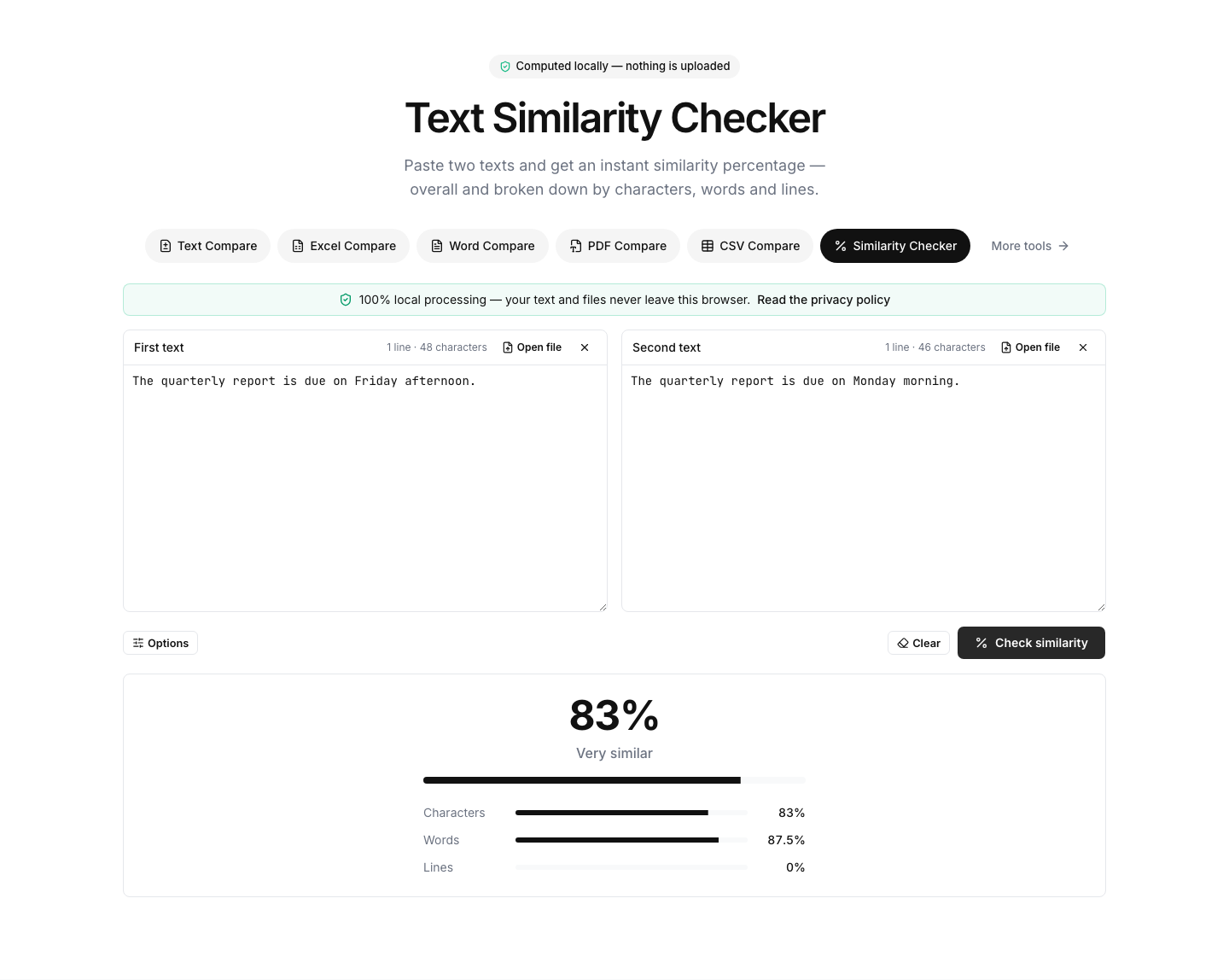
The Similarity Checker computes the Dice coefficient at all three levels and shows a percentage for each — Characters, Words, and Lines — beneath a headline overall score. Paste your two texts, click Check similarity, and read the three numbers together: agreement across levels means genuinely similar texts; a split (high character, low line, say) tells you what kind of difference you're looking at. After the first check the score updates live as you edit, and the Ignore case and Ignore whitespace options discount capitalization and formatting noise. Everything runs locally in your browser — the texts are never uploaded, so it's safe for contracts and other confidential material.
A percentage tells you how much differs, not where. When you need to see the actual differences, switch to the text compare tool: paste the same two texts, click Compare, and every added, removed, and changed line is highlighted side by side, with word-level highlights inside changed lines and a similarity badge summarizing the overall score. The Comparison level switch (Lines, Words, Characters) mirrors the three measurement levels, and options like ignore case and ignore whitespace exclude noise you don't care about. Large texts run in a background worker with a progress bar, so even big documents stay responsive.
The bottom line
Text similarity percentages are surface arithmetic: the Dice coefficient doubles the shared pieces and divides by the total, at whichever granularity you choose. Character level catches typos, word level catches rewording, line level catches structural change — and no level understands meaning, so treat every score as a measurement of overlap, not intent. For the numbers, run both texts through the Similarity Checker and read all three levels together; for the differences behind the numbers, put the same texts into the text compare tool and see exactly what changed. Both run entirely in your browser, so nothing you paste ever leaves your machine.