What Is a Diff? Line, Word and Character Comparison Explained
Learn what a diff really is, how diff algorithms find the smallest set of edits, and when to compare by lines, words or characters — with free private tools.
2026/08/11
Quick answer
A diff is the smallest set of edits — insertions and deletions — that turns text A into text B. A diff tool doesn't describe the two texts; it describes the path between them: keep this part, remove that line, add these words. Everything else in diffing — hunks, side-by-side views, merge conflicts — is just a way of presenting or acting on that edit list.
The one decision you make before comparing is the granularity: what counts as a single unit of change.
| Comparison level | One "unit" is… | Shines for | Watch out for |
|---|---|---|---|
| Lines | a whole line | Code, logs, config files, CSV rows | Rewrapped prose makes every line look changed |
| Words | a word | Prose, contracts, articles, emails | Ignores changes inside a word unless highlighted |
| Characters | a single character | Typos, serial numbers, IDs, URLs | Noisy and slow on long texts |
Our Text Compare tool supports all three — the Comparison level switch toggles between Lines, Words, and Characters — so you can re-run the same comparison at a different zoom level in one click.
A short history: from Bell Labs to git diff
"What changed between these two?" is one of the oldest questions in computing, and one of the hardest for the human eye, which catches some differences, misses others, and takes far too long doing it. A diff answers mechanically, completely, and in milliseconds — and once you understand how one is built, every diff you read (in a code review, a contract redline, or a comparison tool) becomes easier to trust.
The idea has a long pedigree. The original diff utility was written at Bell Labs in the 1970s as part of Unix, and it established two conventions we still live with. First, a diff should be minimal: report the fewest edits that explain the change, not every superficial mismatch. Second, a diff should be actionable: the output could be applied mechanically to another copy of the file to reproduce the change — the idea the later patch utility built on.
That second idea is why diffs conquered software development. Version control is, at heart, the ability to ask for the difference between any two states of a project. When you run git diff, review a pull request, or resolve a merge conflict, you are looking at a direct descendant of that 1970s design. The output conventions evolved into today's unified diff format — the + and - prefixes and @@ hunk markers are what most developers picture when they hear the word.
How a diff algorithm thinks
You don't need mathematics to understand the core move. Given two texts, a diff algorithm hunts for the longest common subsequence: the longest run of units (lines, words, or characters) that appears in both texts in the same order, though not necessarily side by side.
Picture laying the two texts in parallel and drawing threads between matching units, with one rule: threads may never cross. The algorithm finds the arrangement that uses the most threads. Everything connected by a thread is unchanged. Everything left over on the old side was removed; everything left over on the new side was added. That's the whole diff.
The "no crossing" rule explains a behavior that surprises people: moved text shows up as a removal in one place and an addition in another. If you drag a paragraph from the top of a document to the bottom, the threads can't follow it without crossing every other thread, so the diff reports it as deleted-here, inserted-there. The tool isn't wrong — it's answering "what edits transform A into B?", and delete-plus-insert is a valid answer — but it's worth knowing when you review the result.
Finding the best thread arrangement efficiently is the hard part. Most modern tools build on Eugene Myers' difference algorithm, prized for staying fast when the two texts are mostly similar — the common case. If you've searched for diff match patch, that's the name of Google's well-known open-source library in this algorithm family, built for character-level diffing and patching. Browser-based comparison tools like ours run the same family of algorithms locally in your browser, so nothing you paste is ever uploaded.
The three granularities, and when each one shines
Lines: code, logs, and anything structured
Line comparison treats each line as atomic: identical or different, nothing in between. That's the right model for code, configuration, log output, and data exports, because in those formats a line is the natural unit of meaning — one statement, one setting, one record. It's also the fastest granularity on large inputs.
The weakness is prose. Reflow a paragraph so it wraps differently and a line-level diff declares every line changed, even though not a single word did. Good tools soften this: in our Text Compare tool, changed lines get word-level highlights inside them, so you see the two or three words that actually differ rather than a wall of red and green.
Words: prose, contracts, and human writing
Word comparison ignores where lines happen to break and matches word by word. For an edited article, an email draft, or a contract redline, this is the level that matches how you think about the change: "they replaced net with gross", not "line 41 differs".
Characters: typos, codes, and near-identical strings
Character comparison is the microscope. Use it when the texts are short and the differences are tiny: a transposed letter in a name, one digit in a serial number, a stray space in an API key, two URLs that look identical. At this level the diff will pinpoint the exact character that changed. Avoid it for long documents — a character-level view of a rewritten essay is technically correct and practically unreadable.
Reading a diff: hunks, views, and the three colors
However it's computed, a diff is presented in a few standard ways.
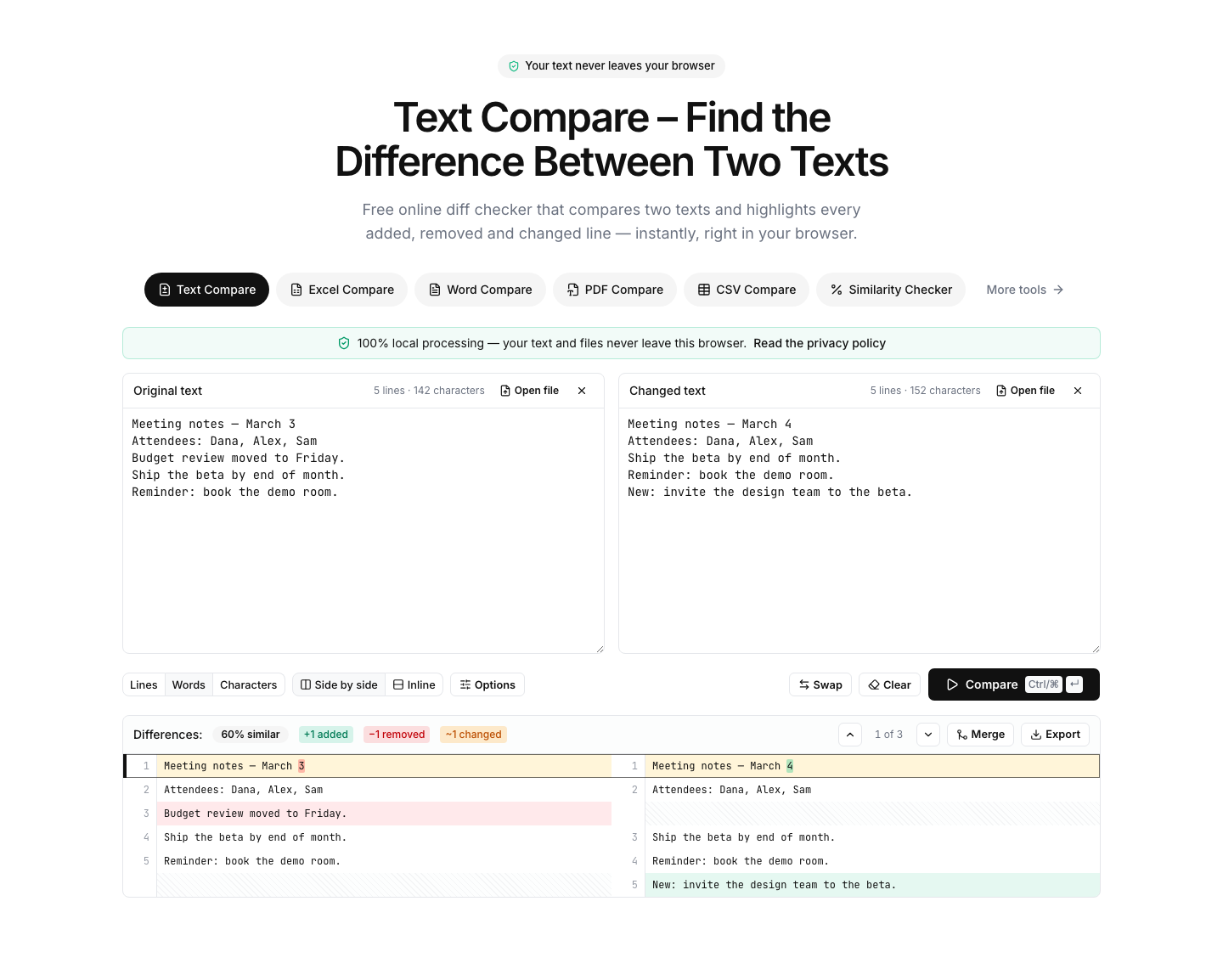
Added, removed, changed. Additions exist only in the new text (conventionally green), removals only in the old (red). "Changed" is really a paired removal and addition on the same spot — old value out, new value in — which is why comparison tools report the three counts separately. Our tool shows these stats above the result, alongside a similarity percentage badge.
Hunks. Long texts rarely change everywhere, so diffs group nearby edits into hunks: contiguous blocks of change with unchanged context around them. A 500-line file with three edited areas produces three hunks, and you review three things instead of five hundred.
Side-by-side vs. unified. A side-by-side diff shows the old text on the left and the new on the right, with changed regions aligned across the gap — the easiest view for humans scanning "before vs. after". A unified (or inline) view interleaves removals and additions in a single column, the compact format git diff prints in a terminal. Neither is better; side-by-side excels on wide screens and prose, unified excels for narrow spaces and for pasting into a report. The Text Compare tool offers both views, and can export the finished diff as PDF, CSV, PNG, or HTML.
Merging: resolving a diff one hunk at a time
A diff also tells you how to combine two versions. Because unchanged regions are agreed territory, the only decisions live inside the hunks — and that's exactly how git presents a merge conflict: here are both versions of this block, pick one.
You can do the same thing outside version control. Our text tool includes a git-style merge mode: for each hunk, choose whether the left or the right version wins, and the merged result assembles itself from your choices. It turns "reconcile these two drafts" from an error-prone retyping job into a handful of decisions.
"How different are they?" is a different question
A diff answers what changed. Sometimes you only need how much — checking whether a rewrite is substantial, screening for near-duplicate content, or triaging which of ten files drifted furthest from the original. That calls for a similarity score, not an edit list.
The two aren't interchangeable. A similarity percentage compresses all the detail into one number, typically by measuring how much material the texts share (our Similarity Checker uses the Dice coefficient, and reports a separate percentage at character, word, and line level, since two texts can share most of their words while sharing few whole lines). The number tells you 87% — it cannot tell you which 13% differs. When the score surprises you, run a diff to find out why.
When a diff misleads you — and the fixes
Formatting noise drowns the real change. Reformatted code — different indentation, brace style, or minification — produces a diff where everything looks touched. Normalize first: our code compare pages include beautify actions, so you can pretty-print both sides into a consistent style and diff what's left, which is the actual logic change. For plain text, the ignore whitespace option does the lighter version of the same job.
Case and line-ending mismatches. Files that crossed between Windows and Mac often differ only in invisible line endings. The ignore line endings and ignore case options exist precisely for this — turn them on and see whether any real difference survives.
Order doesn't matter but the diff thinks it does. Two exported lists with the same items in different order will diff badly. The sort lines option puts both sides in the same order first, so only genuine additions and removals remain.
The texts are huge. Diff algorithms compare everything against everything, so very large inputs take real work. Our tool runs big comparisons in a background worker with a progress bar and a cancel button — the page stays responsive, and nothing leaves your machine regardless of size.
The bottom line
A diff is the minimal edit path from one text to another: compute the longest common material, and whatever falls outside it is your answer. Choose the granularity to match the content — lines for code and logs, words for prose, characters for tiny strings — and pick side-by-side or unified purely by what's easier to read.
For day-to-day use: the Text Compare tool gives you all three comparison levels, both views, hunk-by-hunk merging, and a similarity badge in one place; the code compare pages add beautifiers so formatting noise never buries a logic change; and when a single number is all you need, the Similarity Checker scores your texts at every level. All of it runs entirely in your browser — nothing you compare is ever uploaded.